


First things first: this article is written with Eric Boissonneault. He’s the founder of Systematik, a data consulting agency that acts as an external data team for mid-market e-commerce brands such as Good Ranchers, Axon, Galls, and First Day.
We’ll cover how to turn post-purchase survey (“How did you hear about us?”) answers into measurable attribution inputs by calculating CAC, ROAS, and LTV from what customers say influenced their purchase. We also walk through how to handle non-responders properly so your numbers stay accurate, and how to integrate survey data into your broader attribution system without overcounting or misinterpreting the results.
A powerful simplification of the customer journey
Post-purchase surveys, also known as “How did you hear about us” (HDYHAU), often get dismissed because they do not feel rigorous enough. Analysts prefer hard data such as multi-touch attribution, MMMs, or incrementality testing. Surveys, by contrast, rely on human memory and subjective answers.
But that is precisely what makes them valuable.
When customers answer a post-purchase question, they simplify their journey into one clear story, the moment that felt like the reason they bought.
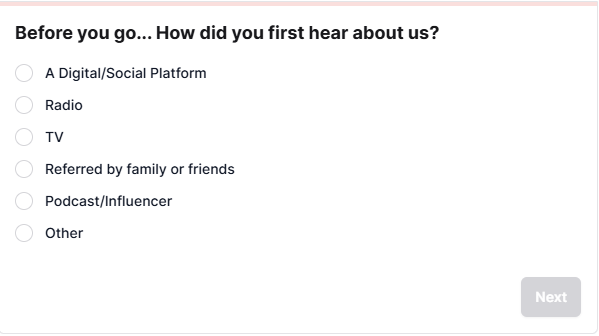
It reveals the part of demand that tracking cannot capture and the part of the journey people actually remember.
What is a post-purchase survey?
Post-purchase surveys vary across industries, but this article focuses on the ecommerce version used for attribution. It captures what tracking cannot: the moment a customer believes they first discovered your brand.
Post-purchase survey captures what tracking cannot: the moment a customer believes they first discovered your brand.
Note: The same concept can work for other industries as well. For example, a SaaS business would typically trigger the survey right after a new user signs up.
When it fires: After a customer completes their first purchase and the payment has been processed.
Where it lives: On the order confirmation page or as a lightweight modal that loads post-transaction.
What it looks like: A form with a single or multiple questions.
Why “HDYHAU” deserves a spot in your measurement mix
Adding a post-purchase survey does not replace MMM or modeled attribution. It fills gaps they cannot see.
1. It captures the untrackable
People discover your brand through podcasts, creators, word of mouth, or PR mentions. Channels that are typically difficult to measure. Surveys make those visible.
2. It adds context to quantitative data
Attribution models and analytics tools capture touchpoints, clicks, and last interactions. What they cannot capture is the moment that felt meaningful enough for a customer to remember.
The answers are subjective, and that’s the point. They reflect what buyers remember influencing them, which is often more useful than perfect precision. You are not recreating every touchpoint. You are identifying the moment that mattered.
3. It is simple to implement
Post-purchase surveys install in minutes.
4. It has low requirements
There is no need for years of historical data or a perfectly clean tracking setup. You can launch it today and start collecting useful signals immediately.
5. It acts as a good reality check
Survey does not replace MMM, or modeled attribution results; they serve as a sanity check against them. When numbers disagree, it helps you understand where perception diverges from data.
6. It is easy to understand
The results are intuitive. Anyone on your team can review the distribution of answers and see where customers say they came from.
7. It is easy to join with other data
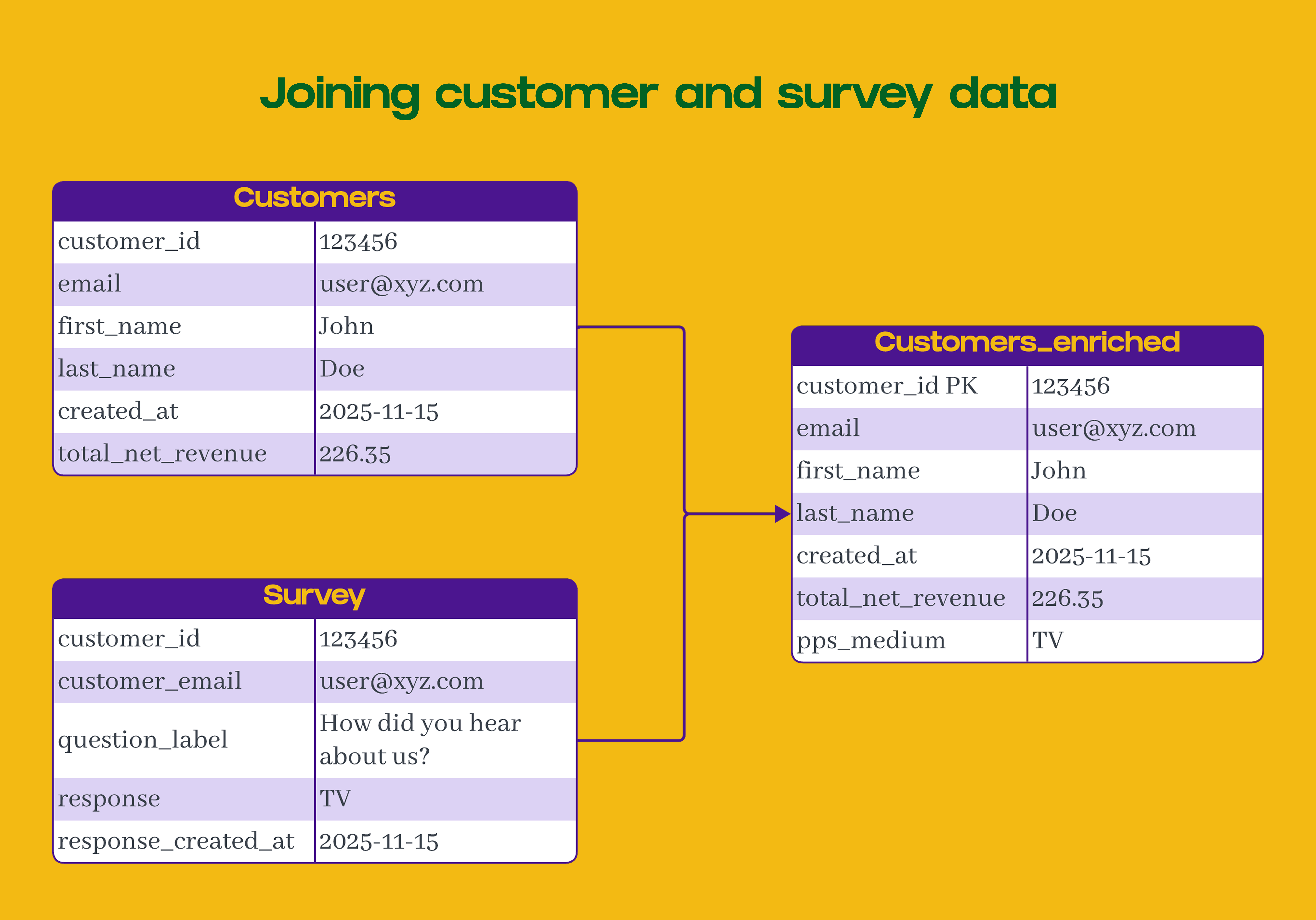
Each response includes an identifier, such as order_id or email, making it easy to join survey data with customer and marketing spend data.
How to implement a first-order post-purchase survey for attribution
1. Choose the right tool
Look for one that integrates seamlessly into both your checkout flow and your data pipeline. KnoCommerce and Fairing are excellent options for Shopify, but any tool can work as long as it supports the core features you need:
The ability to show the survey only to first-time customers
Randomized answer choices to avoid biased selection
A direct way to send responses to your warehouse, whether through an ETL, a webhook, or a simple automation tool
Conditional follow-up questions, if you plan to collect more details
If you decide to add more questions later, partial-response capture becomes essential; otherwise, you risk losing the most important answers when someone abandons the survey partway through.
2. Craft and organize questions
Since the primary goal is attribution, we want the first question to focus directly on that. Start with a simple, familiar question that customers can answer without thinking:
“How did you hear about us?”
If you want to collect a second layer of detail, such as “Which creator?” or “Which show?”, make it an optional follow-up that appears only after the customer selects the relevant category.
Pro tip: To maintain strong response rates, small incentives can help if needed, though most brands already see solid participation without offering them. For first-order surveys, a response rate between 40 and 70 percent is common and generally reliable enough for attribution work.
3. Structure your choices
Answer choices should be clear, distinct, and easy to categorize later. The goal is to make it effortless for customers to choose the right option and for you to analyze the data accurately.
Best practices:
Keep options mutually exclusive.
Good: Social media, Search engine, Podcast, Friend or family
Avoid: Social media, Instagram Ads, Facebook Ads (too much overlap)Use plain, recognizable terms.
Good: Social media, YouTube, Podcast, Email, Search engine
Avoid: Paid social, Video platform, Audio content, Newsletter, Organic discoveryAlign with your marketing spend categories as closely as possible, but prioritize clarity. When a trade-off arises, choose the option customers will understand instantly. Clean responses are more valuable than a perfectly matched mapping. More on that in the next section.
Include “Other (open text)” at the end.
Review “Other” responses regularly. If the same sources appear repeatedly, fold them into your main options. For higher-volume brands, an automated classifier can help maintain clean categories as responses scale.Keep it short.
Limit to about 6–10 options to reduce friction and guesswork.
A clean, well-structured list ensures higher accuracy, fewer “Other” responses, and easier integration with your marketing spend data.

Pro tip: To test your list, ask people across your organization to act as customers from specific channels (Google Ads, Google Search, Facebook Ads, etc.) and answer “How did you hear about us?” If they hesitate or choose differently than expected, your choices need clarification or regrouping.
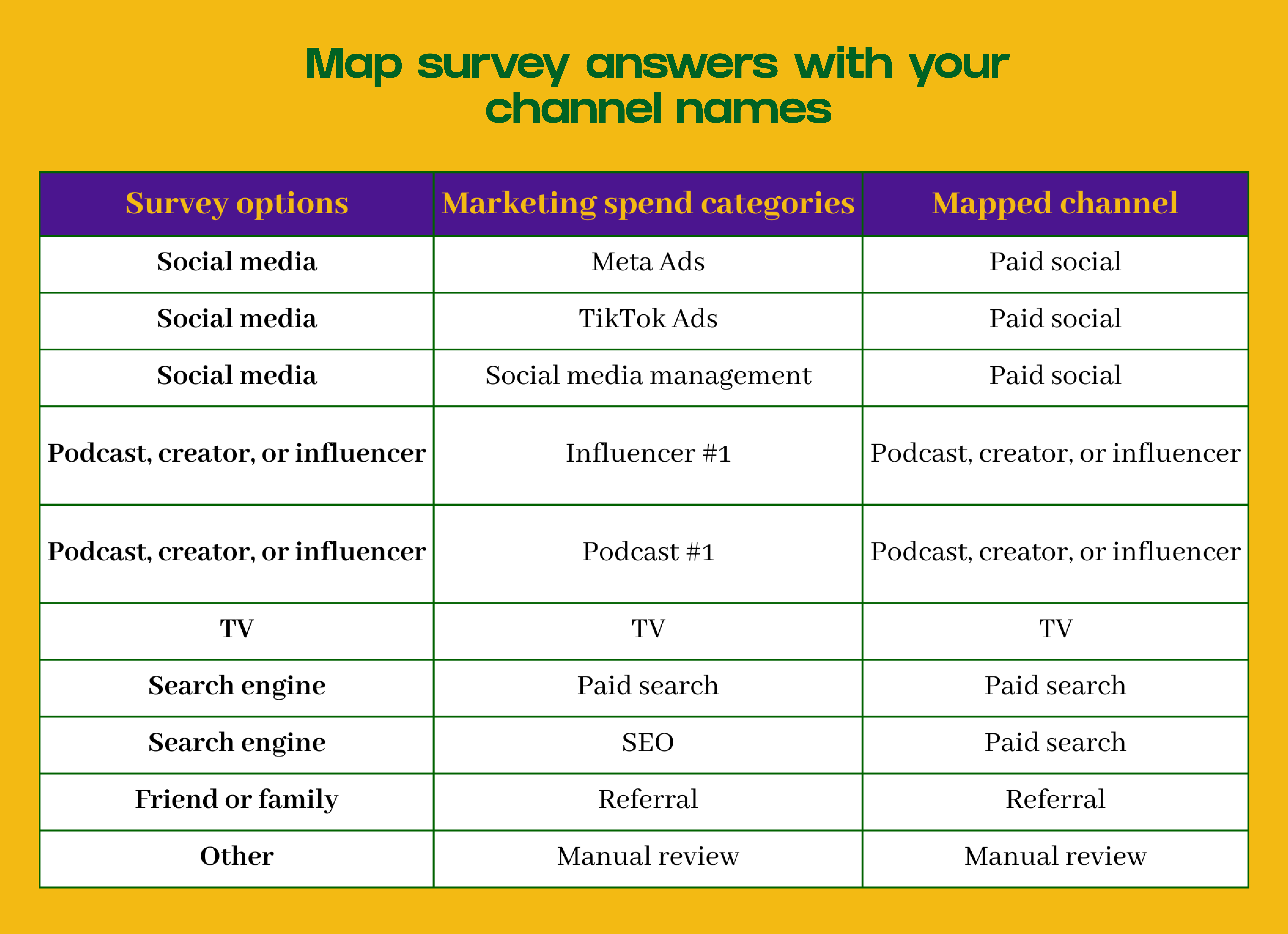
The inevitable mismatch: Customers do not distinguish between your technical marketing channels. Paid search and SEO often collapse into a single “Search engine” answer because most buyers cannot tell the difference.
This limits granularity, but you can account for it by grouping related spend categories on your side. For example, treat paid search and SEO as one unified search channel when running attribution.
The goal is not perfect precision, but a clean, consistent signal you can use for decision making.
From survey responses to actionable data
Up to this point, we’ve focused on collecting high-quality survey responses by choosing the right tool, crafting clear questions, and structuring clean answer choices. Now it’s time to turn those responses into something useful.
You will need some basic SQL knowledge for this part, since the next steps involve joining tables, mapping channels, and running simple aggregations in your warehouse.
This is where everything comes together, and your survey data becomes real insights you can use to make smarter decisions about where to invest.
Let’s build cool stuff.
1. Send responses to your data warehouse
Once your survey is live, set up an automated flow to send responses to your warehouse. You can do this via APIs, webhooks, or ETL tools such as Fivetran or Portable. For lighter setups, Zapier or Make can also handle the transfer.
2. Join with your customer data
Once the data lands, join the survey table to your customer table using email or customer_id. We join the data on a customer level because the survey only shows for the first purchase.
3. Aggregate the results

Aggregate your survey responses by channel to see how often each source is selected, and prepare the data for downstream calculations such as CAC and ROAS.
4. Map answers to marketing spend categories
Your goal is to align the heard_about_us field from your survey responses with the channel names from your marketing spend table. You can use a simple mapping table to connect survey answers to spend buckets.
5. Join with marketing spend data
Once your post-purchase survey data is connected to customers, the next step is to join it with your monthly marketing spend by channel.

Pro tip: If you spend a considerable amount on retargeting campaigns on specific channels, exclude that spend.
Accounting for non-respondents
Not every buyer will complete the survey, and that matters when you calculate metrics like CAC by channel. If you ignore the response rate, your CAC will be drastically inflated.
Connecting response rates to results
When you calculate CAC the usual way, you divide total spend by total new customers:
cac = Monthly marketing spend by channel / Monthly new customers by channel
*All the CACs from this table are wrong because they assume every customer completed the survey, which is rarely true.
How to adjust for response rate
To correct for this, scale your spend by the survey response rate for that specific cohort.
response rate = Monthly number of responses / Monthly new customersadjusted_cac = (Monthly marketing spend by channel * Monthly survey response rate) / Monthly new customers by channelThis way, you are comparing data from the same cohort of customers and spend, rather than using a single global rate that may shift over time.
Achieving a normalized CAC
It normalizes CAC across channels and time periods with different response rates.
It highlights where data is thinner so you can interpret results with the right context.
It keeps your post-purchase survey analysis aligned with real-world participation.
Imagine the following:
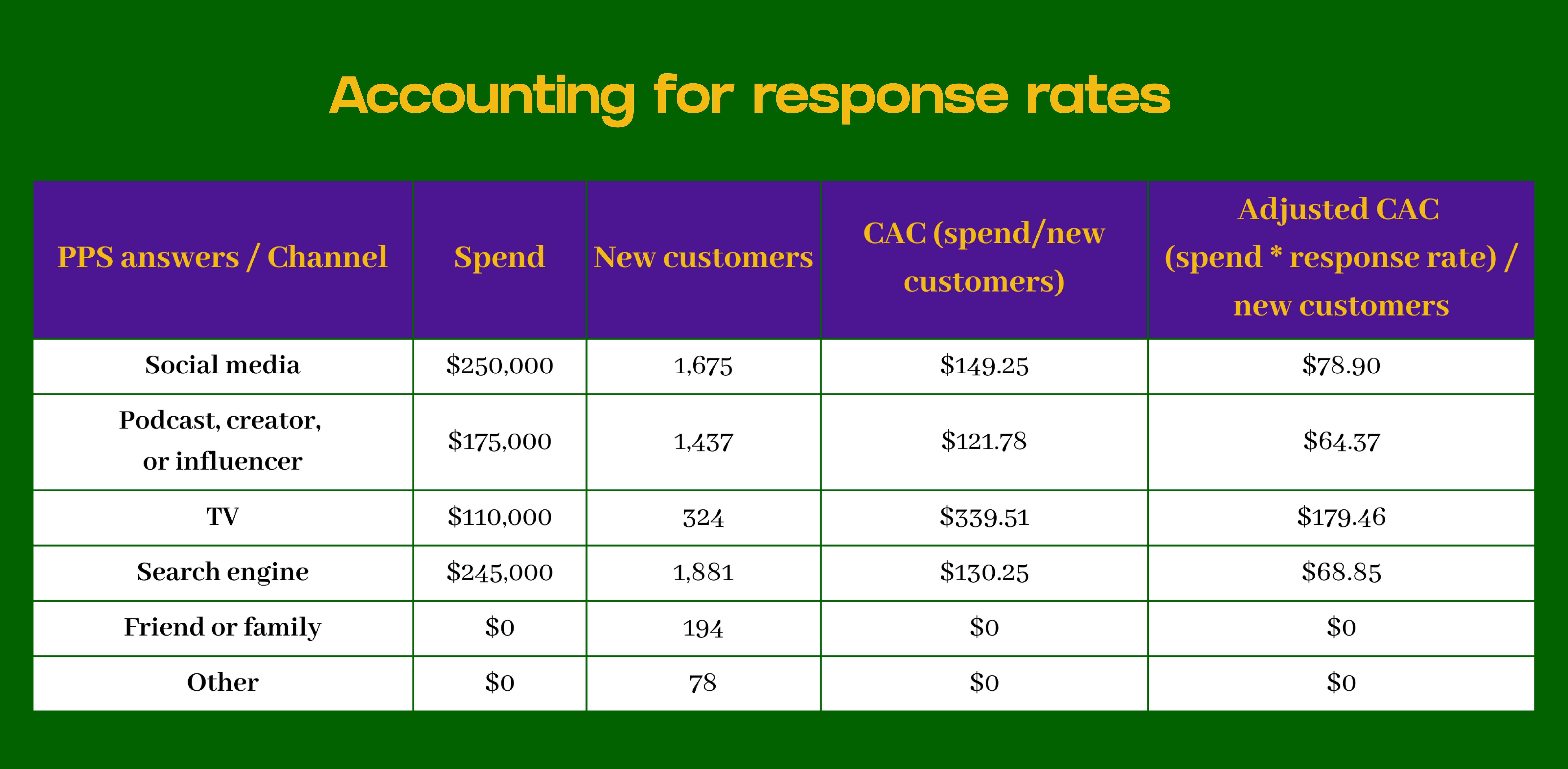
You spent $110,000 on TV ads in November
324 new customers answered the post-purchase survey with “TV” in November.
5,589 new customers answered the post-purchase survey out of a total of 10,574 new customers in November. This means your response rate for November was 52.86% (5,589/10,574).
Here’s how your adjusted CACs would look:
Pro tip: To be extra rigorous, compare the group of customers who answered the post-purchase survey with those who did not.
Look for differences in AOV, repeat purchase rate, refund rate, or the source/medium reported by Google Analytics 4 for that transaction.
If the two groups behave similarly, you can trust your extrapolated results. If they differ meaningfully, consider segmenting your analysis or adjusting how you interpret the survey data.
Pro tip 2: To calculate the CAC for non-responders, you can use the monthly weighted average of your adjusted CACs.
Making decisions based on what people remember
Attribution will always be imperfect. You will never be able to isolate the exact channel or message that caused a purchase.
The goal is not to find a perfect truth, but to collect enough imperfect signals to make confident decisions.
MMM, modeled attribution, platform data, and intuition each tell part of the story. Post-purchase surveys tell the part that can’t be modeled: what people actually remember.
And when you connect those answers to your data warehouse, you create a scalable, quantifiable, and human signal that grounds your attribution system in reality.