


If you’ve looked into server-side tracking, you know the setup can be a pain. You need infrastructure, you need to configure server-side GTM, and you need to make sure client and server events don’t duplicate. Stape (our sponsor for this edition) provides the server-side GTM infrastructure, pre-built templates for major ad platforms, and automatic event_id generation for deduplication.
It’s what I recommend to clients starting with server-side or dealing with Meta event duplication issues (which I’m afraid happens too often). You can start with a free account and test a single event before committing.
The decision between client and server side for conversion events
The client-side versus server-side decision isn’t about choosing better technology. It’s about understanding where your conversions happen and which tracking method will actually capture them.
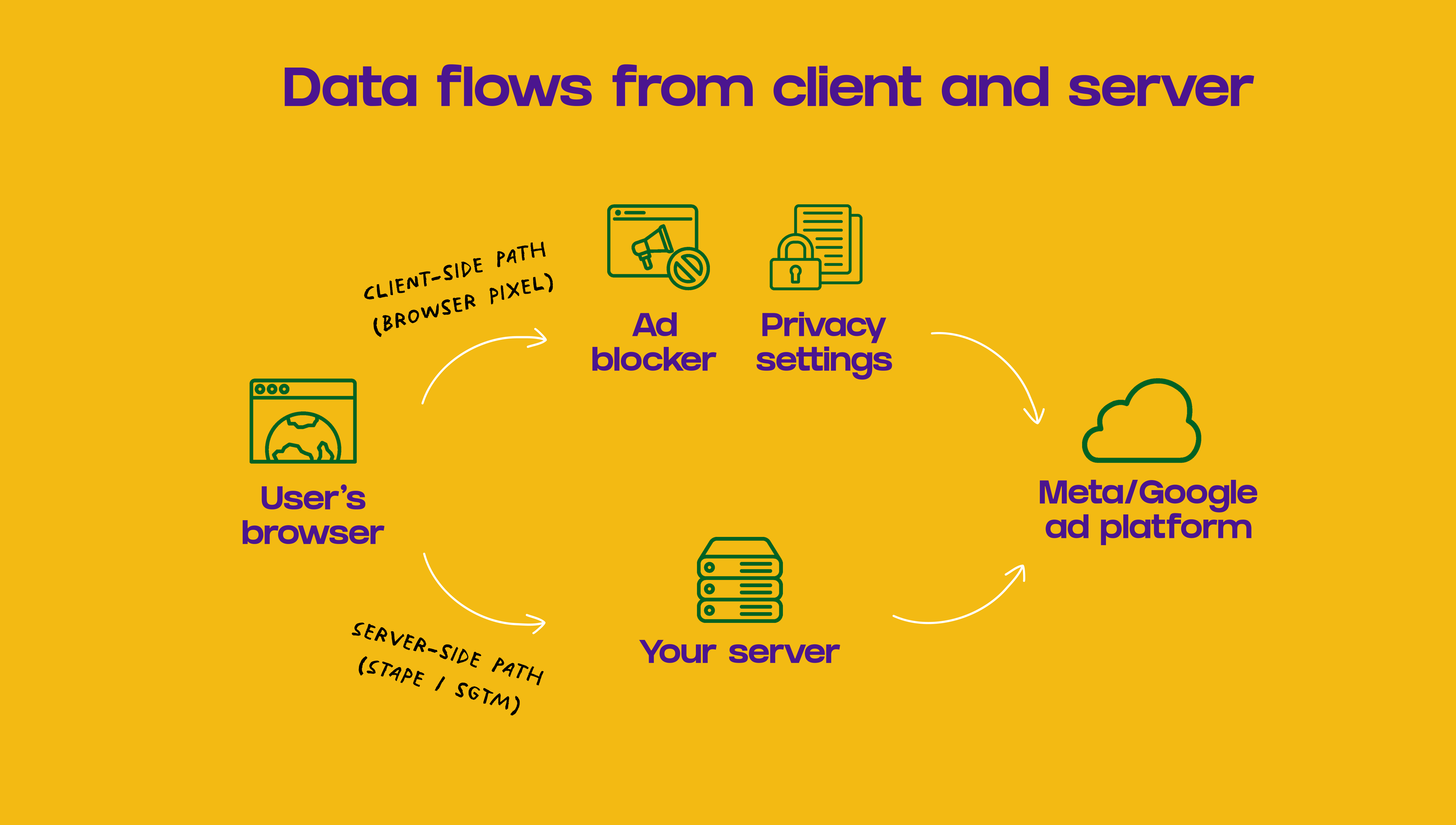
If your most valuable conversions happen in the browser during the session, client-side works fine. But if they happen later in your backend (payment confirmed, lead qualified, subscription activated from expired trial), the browser can’t see them.
In this article, we’ll cover how to make the decision of where to fire your events from.
Attribution and optimization depend on seeing conversions
For paid campaigns, conversion tracking serves two purposes.
First, you need conversions attributed back to the campaigns that drove them. When someone clicks your ad and converts, the platform needs to know that happened. This is how it learns which audiences and targeting work. More attributed conversions means more data for the algorithm.
If conversions happen but don’t get attributed (cookie expired, click ID lost, browser blocked the script), the platform never sees them. You might have 100 actual conversions, but if only 60 get attributed, the platform only has 60 data points.
Second, you want to send the version of the conversion that matters to your business. A platform optimizing for “form submitted” will behave differently than one optimizing for “qualified lead accepted by sales.” The more the event reflects real value, the better the optimization.
The difference is where and when events fire
Client-side captures what happens in the session
With client-side tracking, the event fires directly from the user’s browser (or, from the app) when the action happens. Someone completes a purchase, the browser fires the event right then.
Usually, this automatically respects consent-mode restrictions, which are easy to implement with client-side GTM. You get an accurate picture of what happened in that session, captured in real time.
The problem: client-side is vulnerable to anything that interferes with the client. Ad blockers, privacy settings, connection issues, or the user closing the page before the script finishes. When any of these happen, the event never reaches your ad platform.
Client-side reflects exactly what happens in the session, at the moment it happens.
Server-side gives you control over timing and content
With server-side, the event is sent from your server directly to the ad platform. The data can reach your backend from the client, or from another source (your CRM, payment processor, etc.).
Because it fires from your server, ad blockers and browser privacy settings don’t affect it. More importantly, you can delay when the event fires. You can wait for payment confirmation instead of firing on checkout submission. You can calculate a lead score before marking someone as qualified. You can replace preliminary revenue with fraud-checked amounts.
The tradeoff: consent logic needs careful implementation. A browser automatically usually blocks itself when users don’t consent. Your server doesn’t. You need to explicitly handle consent signals.
Server-side lets you decide when to fire the event and what version to send.
Server-side attribution works better with PII
Client-side relies on cookies and click IDs
Client-side attribution uses click IDs from the browser (gclid, fbclid), cookies that identify the user, and optional hashed PII (though many teams avoid this for security reasons).
This works well when the conversion happens in the same session, the browser keeps the click ID, scripts aren’t blocked, and cookies are accepted.
It breaks down when the conversion happens later after cookies expire, the browser removes click IDs (Brave does this), there’s a cross-browser/device journey, or user settings block tracking.
Server-side can safely send PII for better matching
Server-side can also pass click IDs (and should), but the bigger advantage is PII.
Sending hashed email addresses and phone numbers from the server is safer than exposing them client-side. Platforms like Meta and Google use this to match conversions even when cookies and click IDs fail.
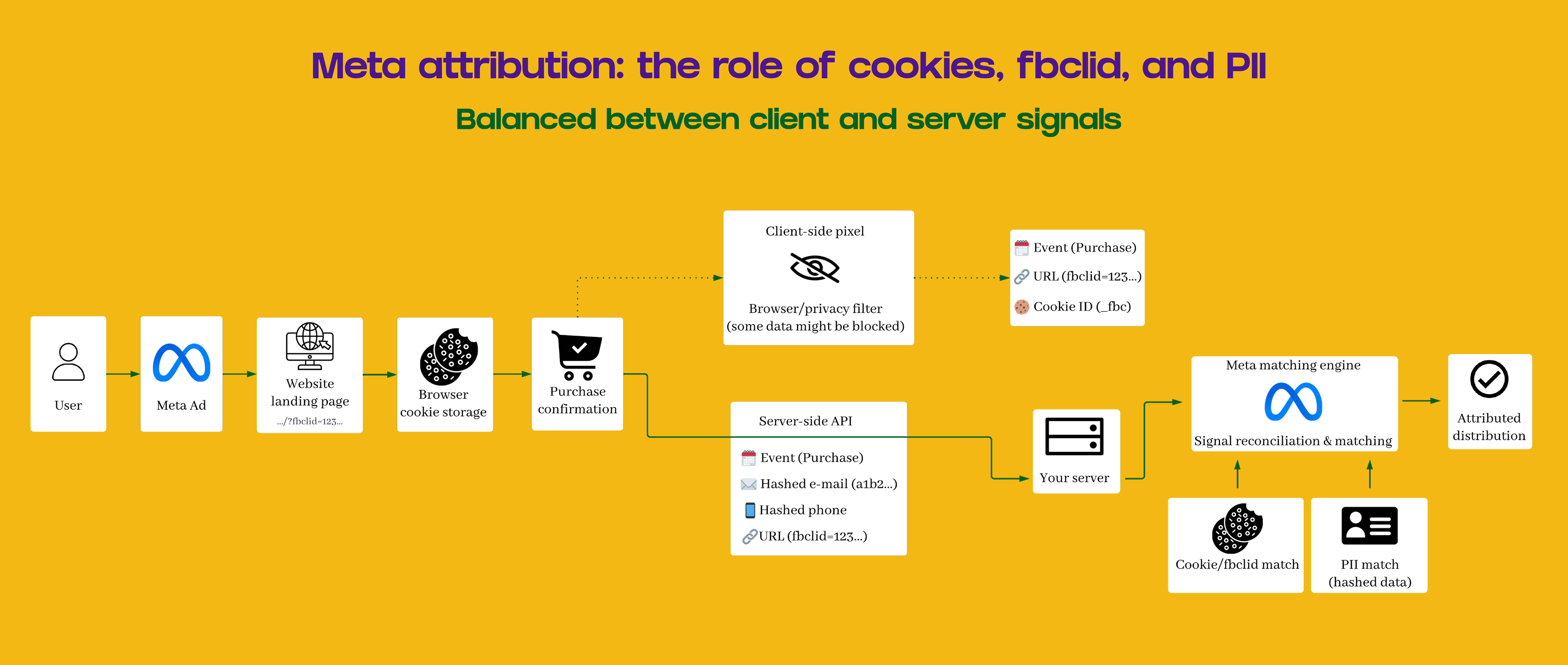
And because you can delay the event, you can enrich data with tools like Clearbit or Clay before sending. This generally improves attribution, especially for conversions outside the initial session.
Three ways to implement server-side tracking
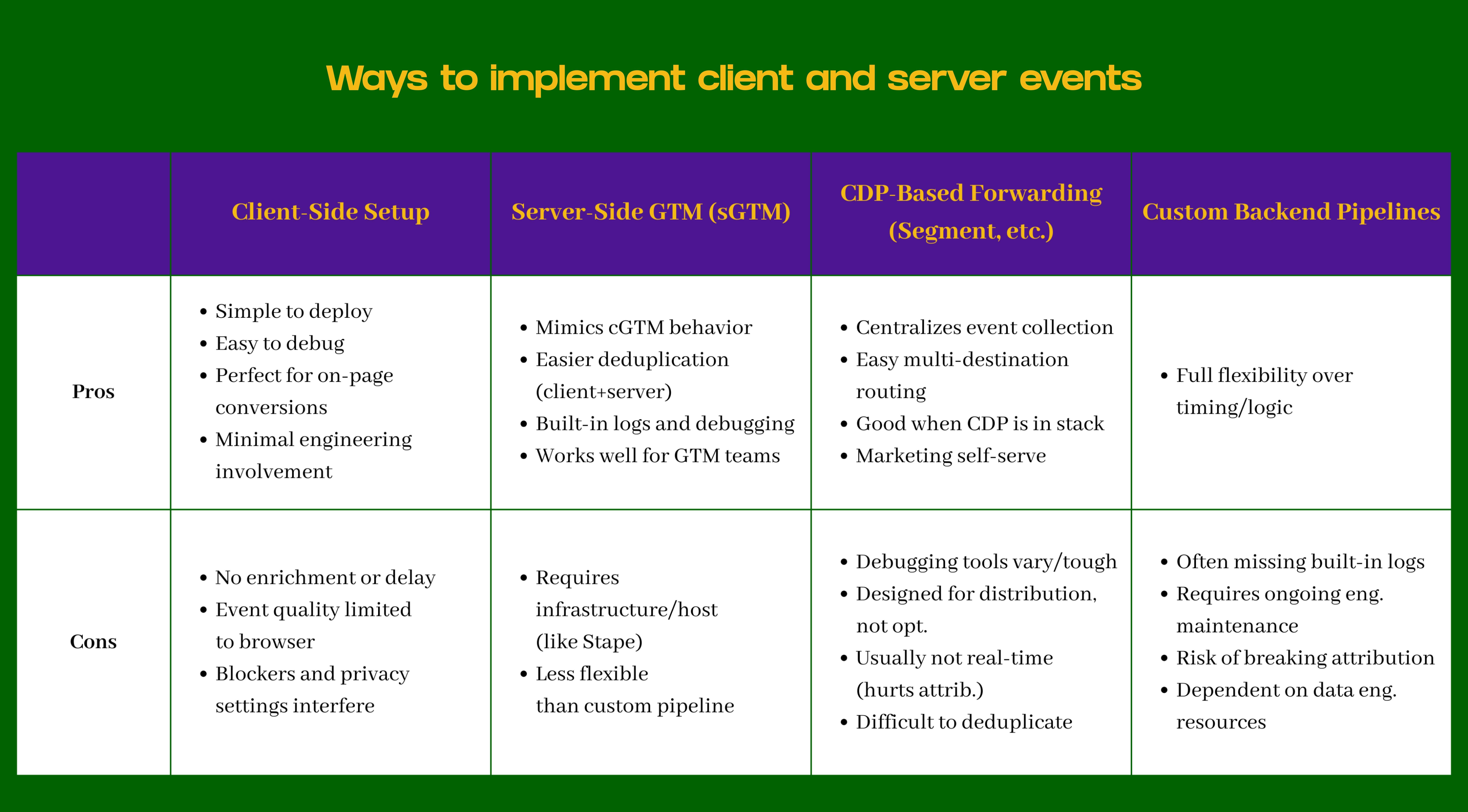
Client-side implementation is straightforward. Most teams use Google Tag Manager or direct pixels. Simple to deploy, easy to debug, minimal engineering involvement.
Server-side has three main approaches with different tradeoffs.
Server-side GTM mimics client-side behavior
Server-side GTM works like the web container most marketing teams already use. The interface looks familiar, and marketing teams can often manage it after initial setup.
You get built-in debugging tools, easier deduplication between client and server events (both use the same GTM structure), and marketing can self-serve most changes.
The downsides: you need infrastructure to run the server or a hosted provider. And it’s less flexible than a completely custom pipeline.
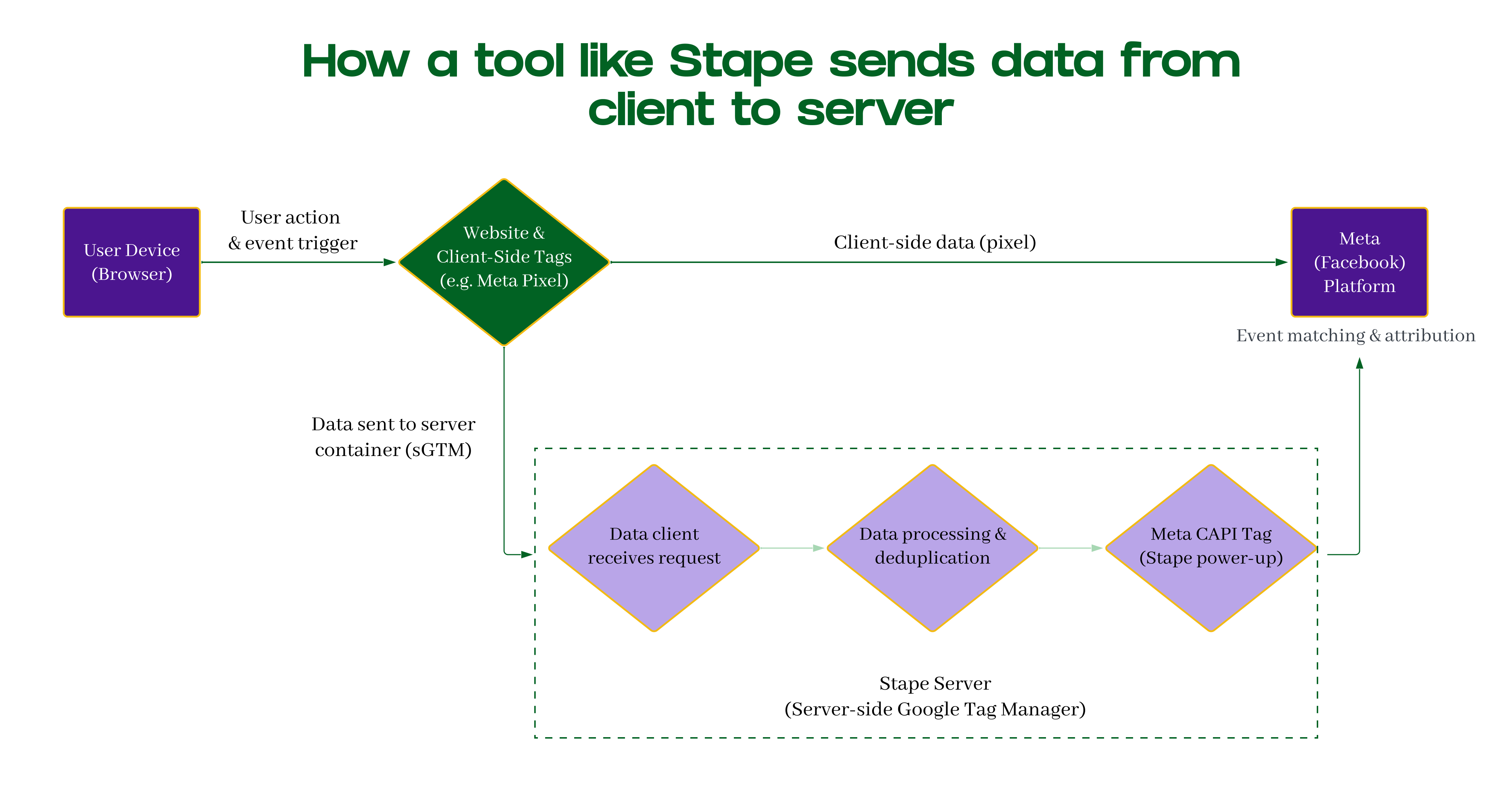
This is the main use case for Stape, as they provide the infrastructure here. They handle the server setup, generate event_ids automatically for deduplication, and manage connections to platforms like Meta. You get server-side GTM without maintaining your own server.
CDPs centralize data but aren’t optimized for paid
Tools like Segment, RudderStack, and mParticle collect events once and send them to multiple destinations.
If you already have a CDP in your stack, the benefits are real. Event collection gets centralized, routing to multiple destinations is easy, and marketing can usually configure destinations without engineering.
But CDPs aren’t designed for paid media optimization. Debugging tools vary between platforms and can be difficult. Most don’t send events in real time, which hurts attribution and targeting. And deduplicating client/server events through a CDP is often complicated.
If you’re already paying for a CDP and using it extensively, it might make sense. However, deduplicating client-side and CDP-powered server events is usually quite difficult.
Custom pipelines give full control but need engineering
Some teams build custom backend pipelines that fire client side events, store them on a server, and then send to ad platforms.
The advantage is complete flexibility over timing, logic, and event structure (like, everything). The disadvantages add up: no built-in logging or debugging tools, every change requires engineering, easy to break attribution if not aligned with client-side logic, and ongoing maintenance becomes a permanent engineering responsibility. Most marketing teams do not love this.
This works for teams with strong engineering resources and very specific needs. For most marketing teams, it creates more problems than it solves.
What works for different business models
The right approach depends on where your conversions happen and when their value gets determined. Here’s how this plays out across common business models.
E-commerce usually works fine with client-side
For most e-commerce businesses, client-side tracking captures what matters. It works well when:
Purchase happens quickly after landing
Transaction occurs in the same browser they clicked from (works better for Google Ads than Meta’s in-app browser)
Click IDs are reliably present
Revenue value is accurate at transaction time
If your typical journey is: click ad, browse, buy in the same session, client-side captures it.
Server-side makes sense when you need to adjust revenue after returns or fraud checks, want to optimize for predicted customer lifetime value, or when significant purchases happen across devices.
If you want to set up CAPI for ecommerce, there are many many tools for the main platforms (like Shopify) that can make this straightforward.
Subscription products need server-side for meaningful conversions
For subscription businesses, the conversions that matter happen after the browser session ends.
Someone might sign up during the session, but the value gets determined when payment processes through Stripe, when they complete onboarding and activate, when they renew after the first cycle, when revenue clears fraud checks, or when they upgrade their plan.
The browser can’t see these. They happen in your backend, and sometimes days or weeks later. If you’re only tracking signup client-side, you’re optimizing for signups, not for paying, activated, retained customers.
Server-side lets you:
Send the event when payment is confirmed, not just when someone submits their card
Optimize for predicted lifetime value (ROAS) instead of signup count (CPA)
This fundamentally changes what the ad platform optimizes toward.
Lead generation works better when you wait for qualification
The browser only knows: this person submitted the form.
Your business cares about different questions. Is the lead qualified? Does it fit ICP? Did sales accept it? Did it convert to a customer?
Important point: enrichment tools like Clearbit don’t get sent directly to the ad platform. They help you decide which leads are valuable enough to send as conversions.
With server-side, you can:
Wait to see if the lead passes qualification before sending anything
Promote raw leads to qualified leads only after validation
Avoid polluting optimization with low-quality submissions
Send conversions based on CRM outcomes (sales accepted, meeting booked) instead of browser form submissions
Include predicted lead score or LTV in the event data
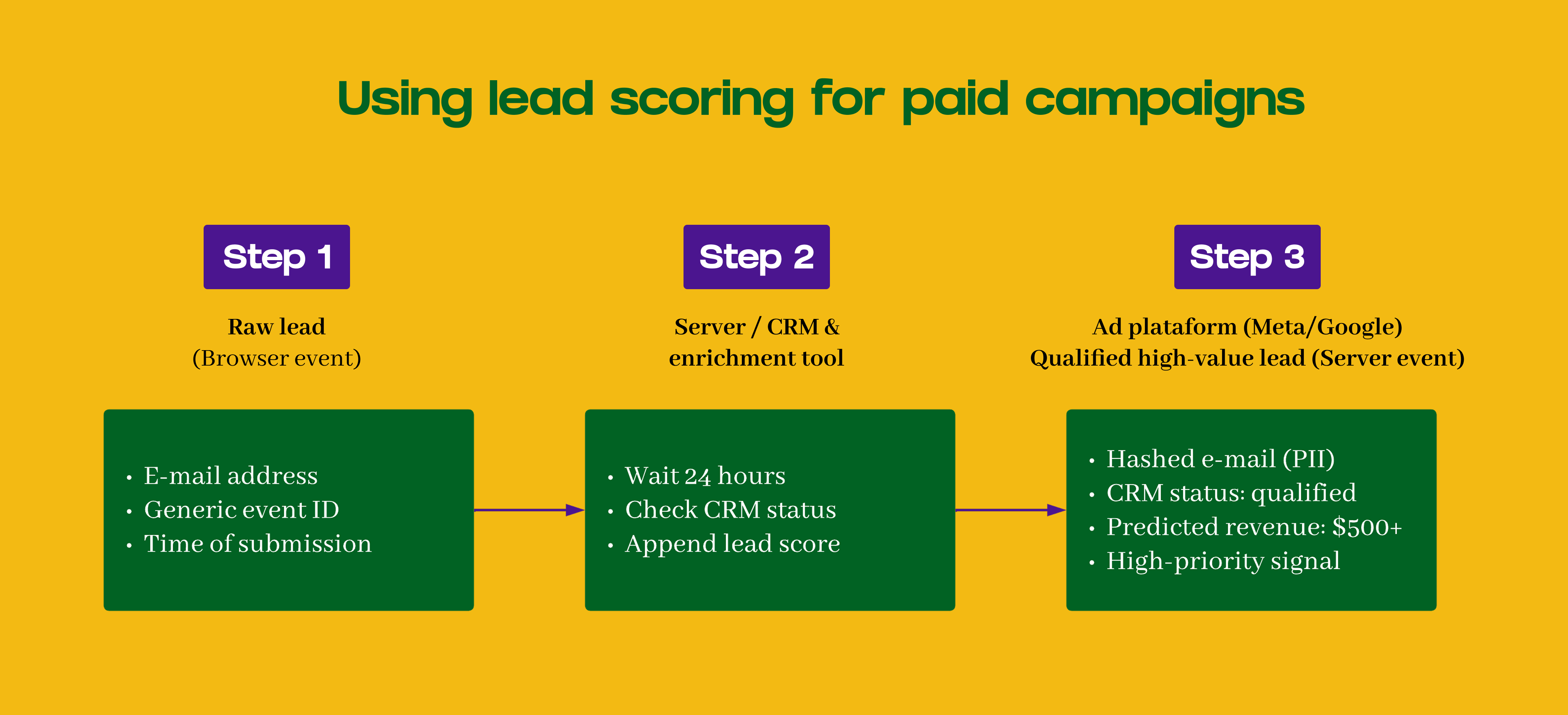
The platform sees “high-value lead that fits ICP” instead of just “lead submitted.” You optimize for business value, not form volume.
Some conversions only exist in your backend
Some conversions can’t be captured client-side because they don’t happen in the browser.
Payment confirmed after third-party processing. Revenue adjusted after fraud checks. Sales-qualified status triggered in CRM. Trial automatically converted to paid after 14 days.
The browser closed hours or days ago. For these, server-side is the only option.
Deciding what you actually need
The decision comes down to two questions: where do your conversions happen, and when does their value get determined?
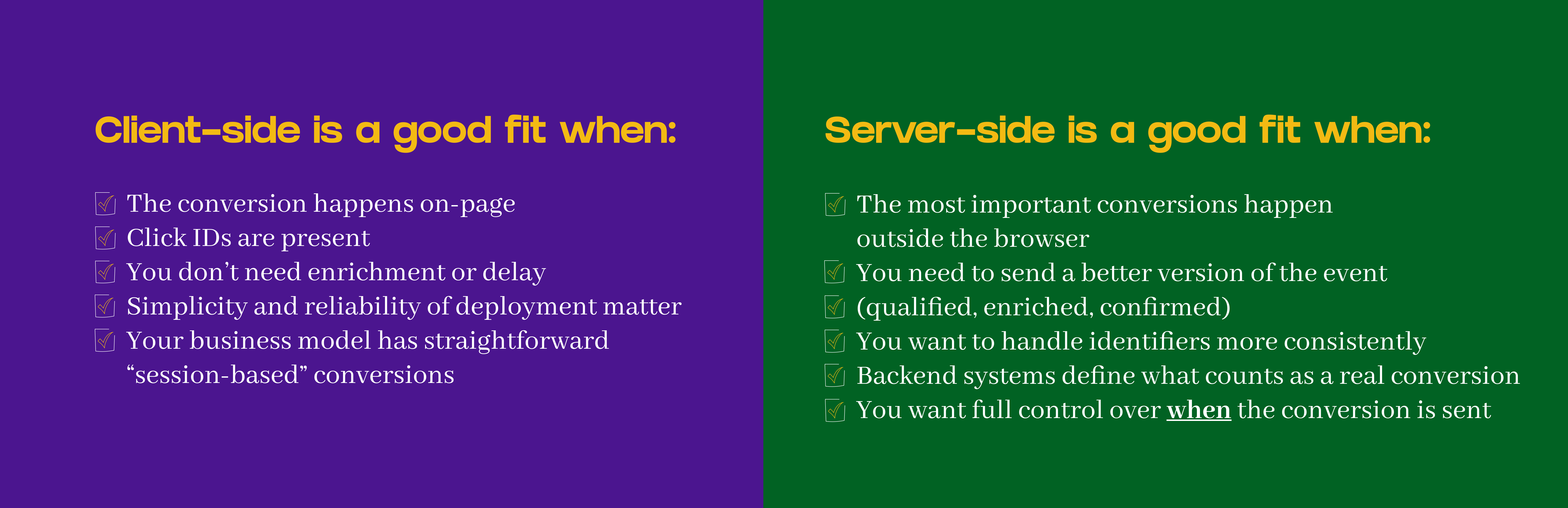
Client-side makes sense when conversion happens on-page during the session, click IDs are reliable, you don’t need enrichment or delay, simplicity matters, and you have limited engineering resources.
Server-side makes sense when important conversions happen outside the browser, you need to send a better version of the event (qualified, enriched, confirmed), backend systems define real conversions, and cross-device or delayed conversions are common.
You might need both when you want immediate on-page events for short-term optimization plus backend-confirmed events for long-term value. This is common in subscription and lead-gen models.
Start small and test
Don’t move everything at once. Start with your highest-value conversion that happens outside the browser. Test whether it improves optimization and campaign performance.
The biggest mistake teams make is treating this as all-or-nothing. You can run hybrid. You can start with one conversion type and expand only if it works. It’s also ok to run come campaigns optimizing towards client events, some server events and some both. As always, the answer for marketing is: it depends!
Take the first step with Stape
If you want to test server-side without building infrastructure, Stape makes it straightforward.
Start with a single event (qualified lead, subscription activation, whatever matters most) and see if it improves your campaigns. Their infrastructure handles the technical setup, deduplication, and platform connections.
Once you’re storing the client-side data on a server, you can start to enrich it with events that never made the client or predicted values. Then it starts to get really powerful.
Pricing starts at $17/month. Create a free account here to test before committing.
Really helpful overview, thanks for writing this. One nuance I’d add: when we say “server-side isn’t affected by ad blockers or browser privacy settings”, that’s only true for the delivery of the event, not for the existence of a usable signal in the first place. If an ad blocker or strict browser settings prevent any meaningful client-side signal (no click, no click-ID, no cookies, no view, no purchase...or other event hitting the backend), server-side tagging can’t magically recover that.
Also, in the common “web GTM → sGTM” setup, most server events are still mirrors of browser events, so if the browser event never fires, the server event won’t either. The really big wins from server-side show up when the source of truth is the backend/CRM/payment provider - server side tracking (not tagging).